Quality checks that unlock in order
On a building site, some inspections must happen in a fixed order. VisiLean's Quality module had no way to say so. I designed sequences, where step 3 stays locked until step 2 is approved, on web and Android, with AI that suggests and people who decide.
- VisiLean
- Product design, design engineering
- Prototype signed off, in build
- 2 January 2026
- 14 min
You cannot sign off a wall panel before the structure behind it is approved. Everyone on site knows this. In VisiLean's Quality module, nothing could say it.
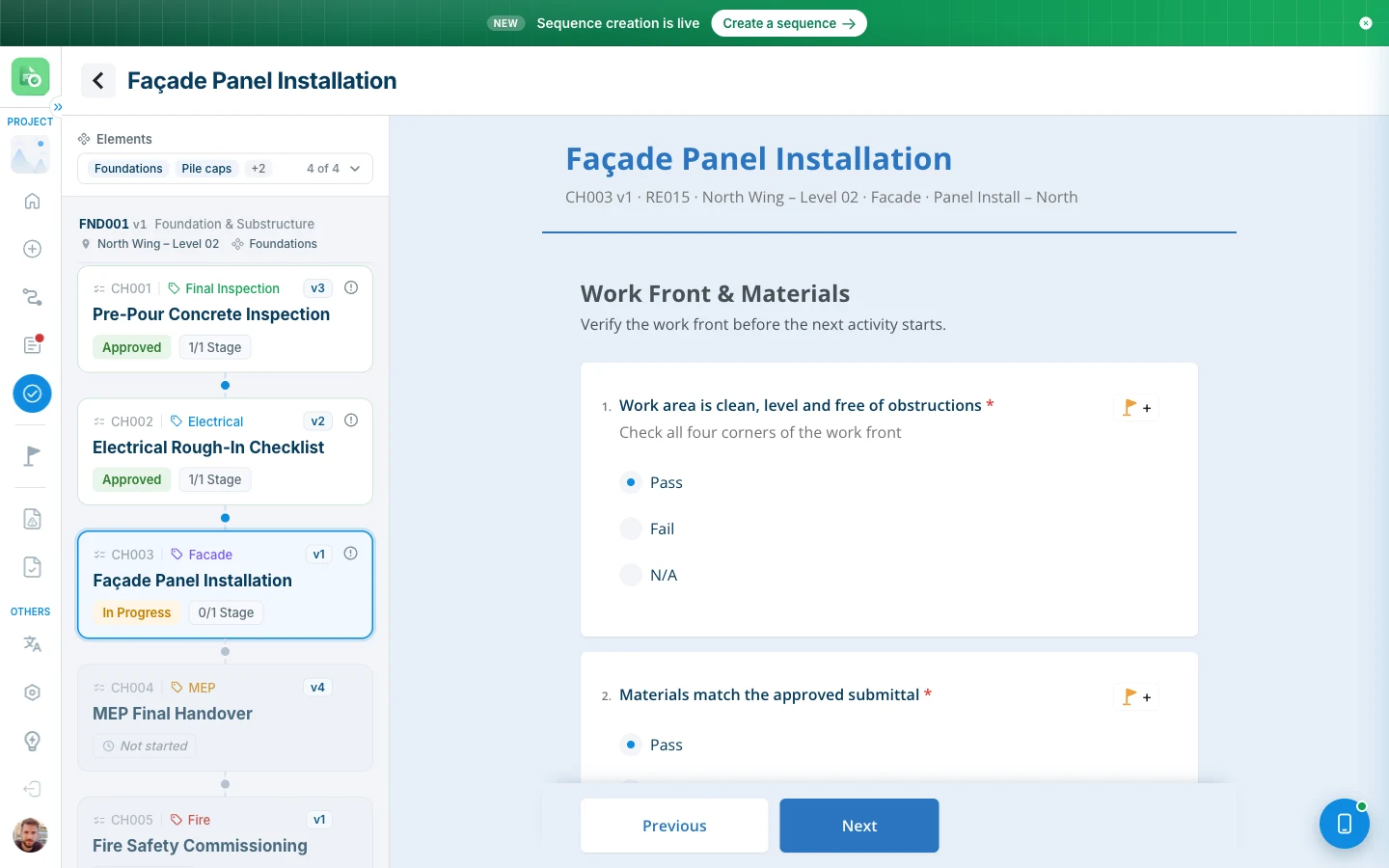
The product, in one minute
VisiLean is software for running construction projects. In its Quality module, someone fills in an inspection checklist on site, sends it, and one or more people approve it. If an answer fails, it raises a snag: a short conversation about that one question, until it is fixed.
The module already worked. Two things were wrong with it:
- Nothing was written down. The product had grown for years with no spec. Everything it did lived only in the code, so every new feature started with guessing how the old one worked.
- It could not handle order. It could hold one checklist, filled many times. It could not say: these five checklists, in this order, and step 3 stays locked until step 2 is approved.
The second problem is what this project is about.
My part
- I wrote the spec of the existing module first, so I was not inventing rules it already had.
- I designed sequences into the module, on web and on Android.
- I built both as working prototypes. The web one is a copy of the real product's front end, with sequences added. It is the spec engineers build from.
- Not in scope: the server, and sending emails. The 16 email templates are designed; the prototype does not send them.
A morning with one sequence
This is the whole flow, followed through one piece of work: the foundations of North Wing, Level 02.
1. The creator builds the sequence once. "Foundation & Substructure", short ID FND, five checklists in order: pre-pour concrete, electrical rough-in, façade panels, MEP handover, fire safety.
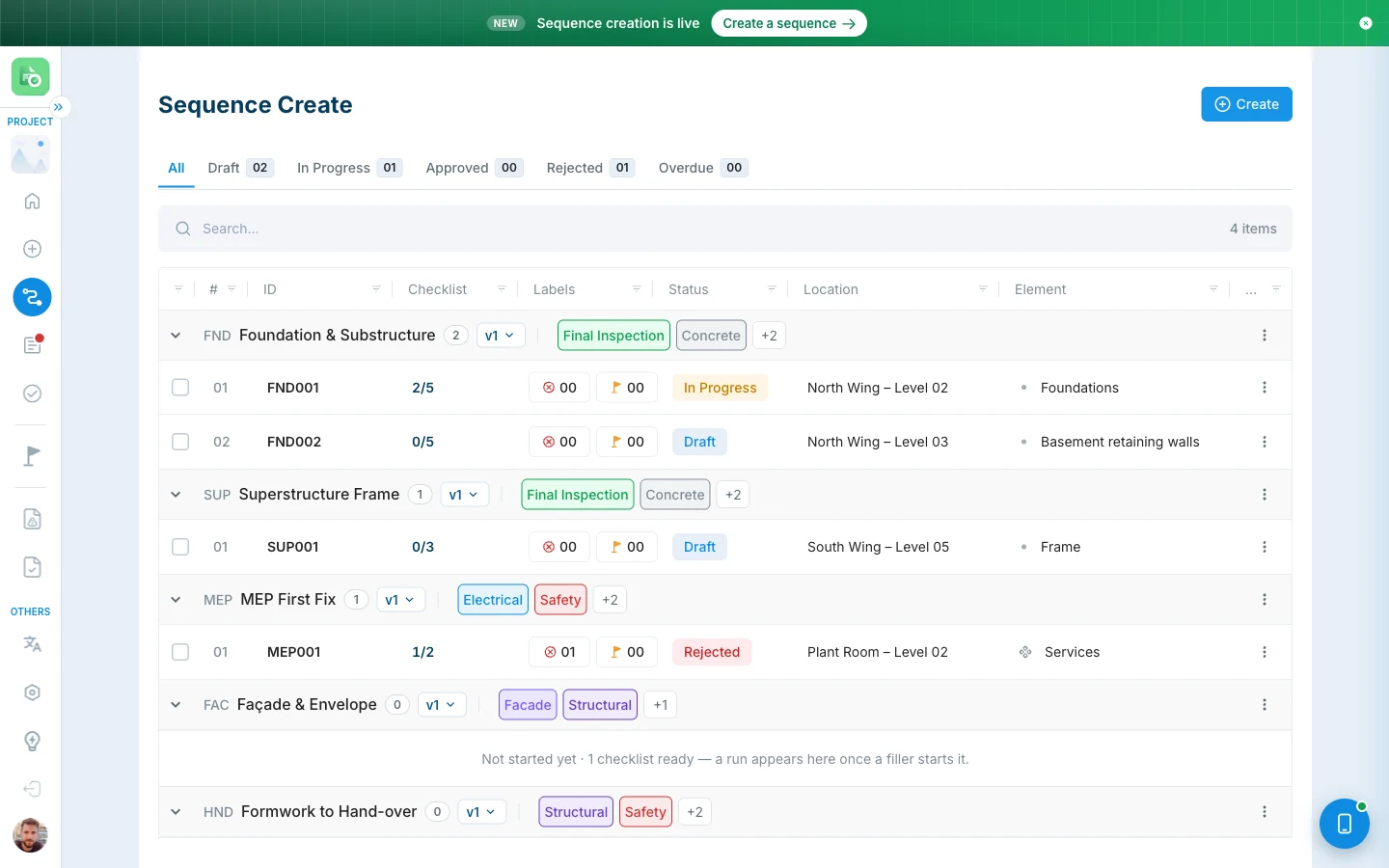
2. A site engineer starts a run. She picks the location, the trade, the task, and which parts of the building it covers. That creates FND001: one run, with one record for each of the five steps.
3. She fills step 1 and presses Submit. Before it goes, an AI check reads her answers and marks any that look weak. She can fix them, or submit anyway. It is her call.
4. The approver approves step 1. Step 2 unlocks, and the person who fills step 2 is told.
5. At step 3, the approver finds the pile caps are not ready. The rest of the foundations are. So she takes the pile caps out of this run. They will continue in a run of their own, and FND001 carries on without them.
6. At the end, the run exports as one PDF, with every step, every approval and every snag. A whole sequence exports as a ZIP of run PDFs.
VisiLean Quality, web prototype
Open in a new tab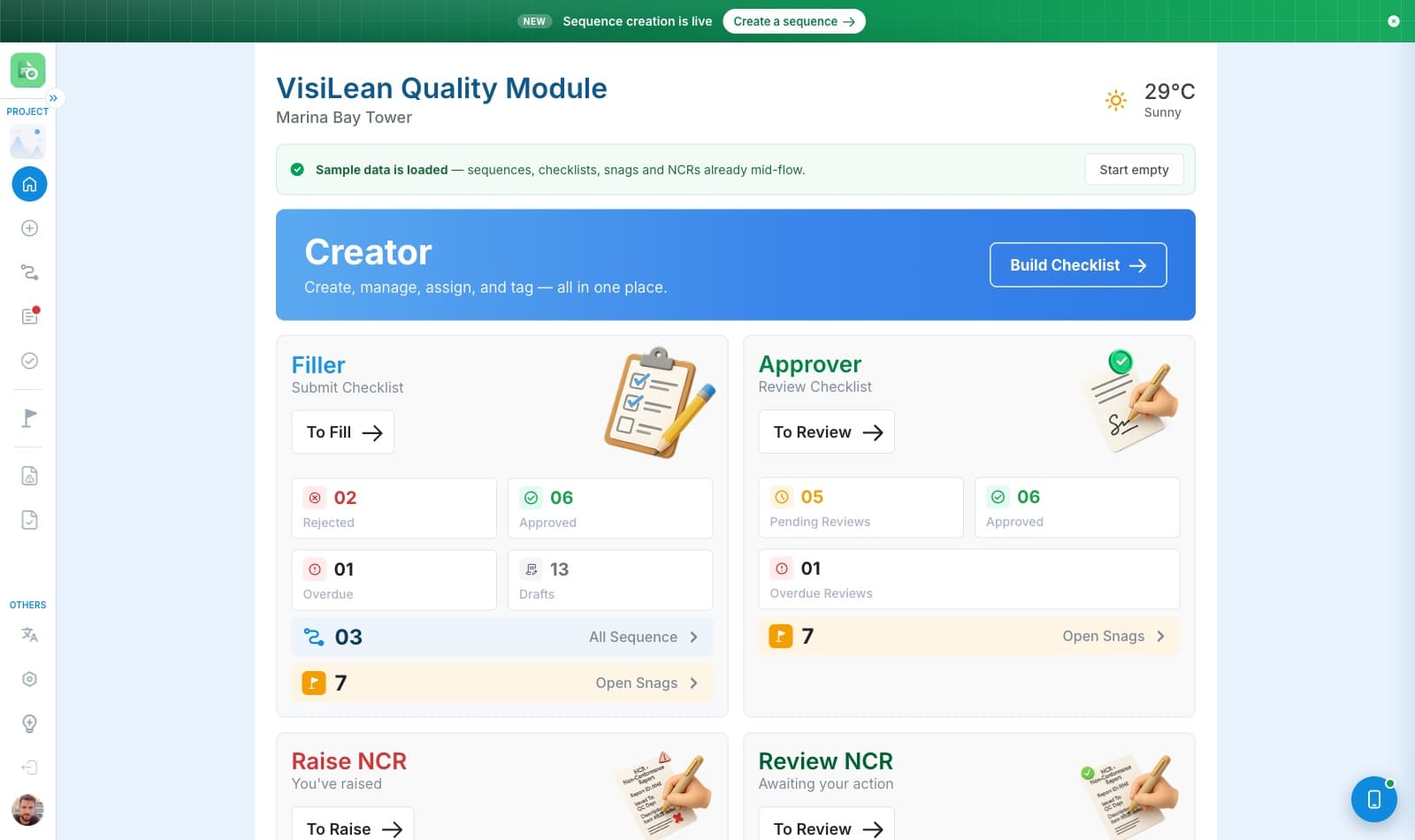
Decision 1: a sequence is a blank form, not a list
Before. The obvious way to build this is "a sequence is a list of checklists". That breaks later. It has nowhere to store one particular time someone ran it. Two crews running the same sequence in two places would overwrite each other.
What the product already did. A checklist is a blank form. Fill it in and you get a record of that one inspection. One form, many records. Nobody had named it, but it was there.
The decision. Use the same idea again. A sequence is a blank form. Running it creates a run. One run holds one record per checklist.
That one sentence answered many questions at once:
| Question | Answer |
|---|---|
| Where does the location live? | On the run. One run happens in one place. |
| Where do task and trade live? | On the checklist. They describe the work, not the day. |
| What does the list count? | Runs, not steps. A five-step sequence nobody started is one row, not five. |
| What does an approver approve? | A record, the same as always. Nothing new to learn. |
| What happens on a rejection? | The run stops at that step. The steps before it stay approved. |
Level 2, West
One work front
Level 3, East
One work front
Level 3, West
One work front
One template
Sequence
Five checklists, in order
Status
Progress
Due dates
The result. A run never stores its own status. It works it out from its records every time. Nothing is written twice, so the web app and the phone app can never disagree about it.
Decision 2: a step only opens when the one before it is approved
The rule is simple on purpose. Every screen shows one of three states:
| Where the step is | State | What you can do |
|---|---|---|
| Before the current step | Done | Approved. Anyone can open it, but only to read. |
| The current step | Current | The only one you can fill or decide. |
| After it | Locked | It will not open, and it tells you why. |
Three small decisions sit inside that rule:
- Old steps can be read, not changed. An approved step is a decision someone signed. The buttons are removed, not greyed out. A greyed-out button makes people wonder if they just lack permission.
- A locked step explains itself. Tap it and it names the step in the way, and its state: "Façade Panel Installation is submitted and waiting for approval." That is the one moment the user is thinking about the order, so it is the right moment to explain it.
- Previous reads through the whole run. Page 1 of step 2 goes back to the last page of step 1. A run is one job, so the joins between checklists disappear while you read.
Decision 3: when part of the job is not ready
The moment. A run covers Foundations and everything under it. Three steps in, the approver finds two parts are not ready. Work cannot continue for those two. It can for the rest.
The options.
| Option | Why not |
|---|---|
| Reject the run | Nothing was actually wrong. The history would say something false. |
| Cancel and start again | Throws away three approved steps of real work. |
| Leave it blocked | The whole building waits for two small parts. |
| Detach the parts that are not ready | What I built. |
My first version, and why I changed it. At first, detaching created the new run straight away, gave it its own "Detached" status and tab, and sent the step back to draft for the filler. The problem: a new run appeared before anyone had decided the step it came from.
The version that shipped. The approver unticks the parts. Nothing new exists until she decides the step. If she approves, the detached parts get a new run whose step is in progress. If she rejects, the new run carries the same rejection. There is no "Detached" status any more.
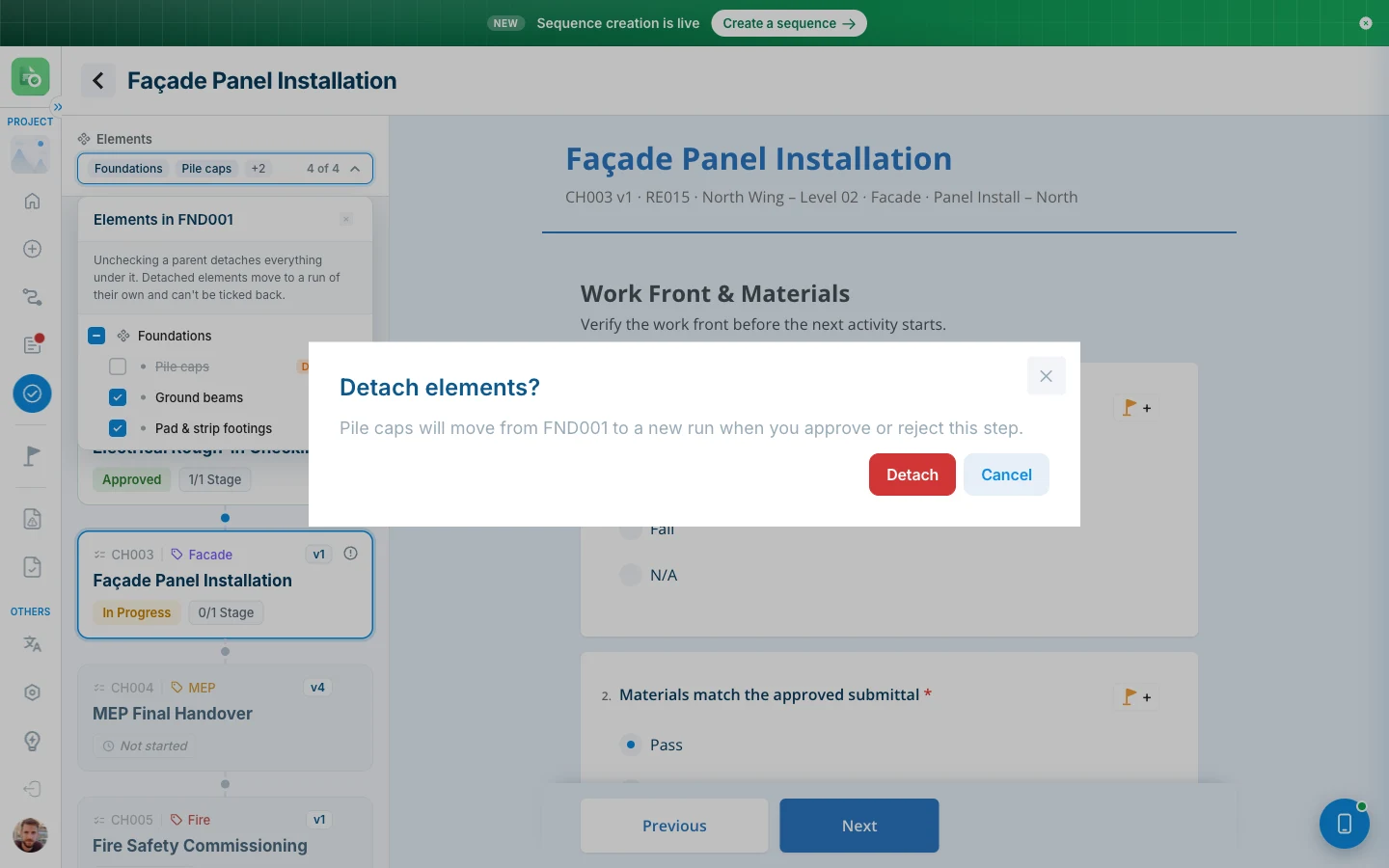
The details that hold it together:
- Only the approver who holds the step can do it. The filler can see the list of parts, because knowing what you inspect is part of the job. She cannot change it.
- At least one part must stay. A run that covers nothing is not a run.
- Unticking a parent detaches everything under it, and the panel says so before you do it.
Decision 4: the AI suggests, a person decides
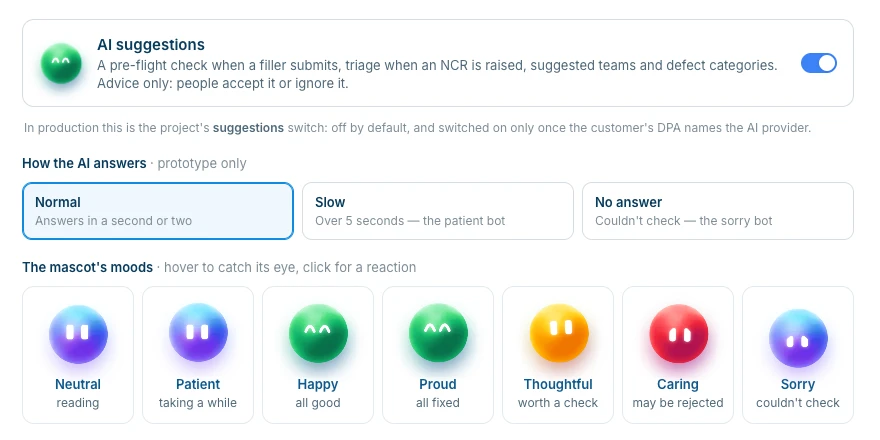
The module now has four AI features, all advice only. I designed the new pre-flight card and the NCR triage card; the other two were already in the build.
- Pre-flight check. When a filler presses Submit, the AI rates each answer as good, worth a check, or may be rejected, with a one-line note. She can fix the answers or press Submit anyway.
- NCR triage. When someone raises a non-conformance report, the AI suggests priority, trade, category and teams, as rows with ticks. Untick any you don't agree with. "Submit as is" saves nothing from the AI.
- Suggested teams. Shown as quick buttons. Any other team can still be picked.
- Defect category. Filled in the background and marked Suggested. Once a person changes it, the mark goes, and nothing overwrites their choice.
The rules it follows:
- It never blocks work. If the AI does not answer within 10 seconds, the form says it could not check and submits normally. An answer that arrives after the person has chosen is ignored.
- It says it can be wrong. The card carries "AI can make mistakes" in plain words.
- It is off by default. A project switches it on only once the customer's data agreement names the AI provider.
In the prototype, the AI is played by rules, not a real model, with a model-sized wait. Settings can make it slow, or make it fail, so the "could not check" path can be tested too.
Decision 5: sequences do not get their own approval system
This was a rule I set on day one. Building a separate approval chain for sequences would have doubled the product. A sequence adds one rule on top of the approval chain that already exists. An approver who has never seen a sequence can approve a step in one without learning anything new.
What I changed my mind about
| Before | After | Why |
|---|---|---|
| A status called "Your turn" | "Fill now" | It names what to do, and matches the button it leads to. |
| Run IDs from one global list, like WF001 | IDs from the sequence, like FND001 | A sequence called RE would number its runs RE001, the same as a response. |
| Location and parts set on the sequence | Asked when a run starts | A sequence is not a place, and it is not a part of the building. |
| One merged PDF for a whole sequence | A ZIP, one PDF per run | Four runs is 400 to 500 pages, and one failed run would break the whole file. |
| The creator as a fourth counter card | A banner | Creating is not a queue. Counters put it in the wrong group. |
| The app opening full of sample data | An empty project, sample data one click away | Sample data reads as "somebody else's data". |
| The parts picker showing a 5px dot | A real tick box with a partial state | The logic was already there. Also, the parent could never become fully ticked, which I fixed. |
| Draft blue on web, grey on Android | One shared set of status colours | Same state, two signals. I chose the web palette and updated the phone. |
Web and phone must agree
They are different apps with different habits. What they share is the data, the words, the rules and the meaning of every colour. What they do not share is the frame. Android turns its top bar green for the approver. The web has no top bar to turn green. Both are right for where they live.
The two prototypes share one saved state. Make a sequence on the web and it appears on the phone while you watch. Anything one side does not understand is passed through untouched, so the phone can never destroy something it cannot draw.
A rejection returns to the filler, who has to reopen it before editing, so seeing why it came back and changing it stay two separate acts.
Small rules for words and colour
- Five statuses: Draft, In Progress, Approved, Rejected, Reopened. Each has one word and one colour.
- Two labels that are not statuses. Overdue is a flag next to the ID, because a step can be overdue and rejected at once, and a badge can only say one thing. Fill now is about you, not the run.
- Three kinds of message. Green for "this happened", amber for "you can't do that yet", red for "something was deleted or failed".
- No message when the screen already shows it. Every message in the product is listed, with what triggers it.
How it was built: AI wrote the code, I made the decisions
I built both prototypes with Claude Code. I set every behaviour and rule, and it wrote the code and the browser checks. The decisions in this study are mine.
The build log records them in my words, for example:
- "Decision taken: use the web palette, update mobile."
- "The user chose the 65px variant."
- "You asked for a plain one-level group list."
The AI also read the existing product's code and extracted the first draft of its spec. To check the work, I had a second set of agents try to disprove each audit finding: 99 held up, 13 did not.
I checked the screens by measuring, not by looking. Looking would have missed most of this:
| What measuring found | What looking would have called it |
|---|---|
| A divider at 1.15:1 contrast | "a bit faint" |
| A menu 133px off its line | "roughly lined up" |
| A 20px icon in a set of 16px ones | "fine" |
| A cell wrapping into a hidden fourth column | two separate complaints from one cause |
What shipped
| Web prototype | One file, no build step, 15 screens. The web app is about 19,200 lines. |
| Android prototype | 5,604 lines, built into the same file. Open it with the phone button. |
| Exports | Real PDFs for a checklist, an NCR and a run. ZIP exports, sorted by status. |
| 16 templates. 11 come from one script, so they cannot drift apart. | |
| Written spec | About 45,700 lines across five documents, for a product that had none. |
| Automated checks | 664 checks in 12 suites, all passing. They test the rules, like a blank form never being mixed up with a run. |
There are no numbers here for time saved or errors avoided, because nobody has measured them.
What has not been proven
The prototypes are signed off and the build is with engineering, but nothing has run on a live site yet.
The step-by-step rule is a strong assumption. Some inspection work really does happen in parallel, and a model that can only say "this, then that" will meet work that does not fit.
What I would do next
- Put sequences in front of real inspection teams, and find out where "this, then that" is not enough. The next thing they will ask for is "these two in any order, both before the third".
- Watch whether people keep the AI's suggestions. The system records whether each suggestion was kept or changed. That is the first number to look at.
- Raise the contrast failures. Several colour pairs come straight from the existing product and fail accessibility rules, like light grey text on white at 2.12:1. They are faithful copies, which makes them a decision to raise, not a bug to fix quietly.